Showing posts with label Find Aadhaar Card Number by Name. Show all posts

Tuesday, 21 June 2016

How to Get Aadhar Card Number with Name

Aadhar Card Number with Name can be easily searched from Official UIDAI Aadhaar Website. This Article talks about How to Get Aadhar Card Number with Name when you don’t have your Aadhaar Enrollment Id or Aadhaar Number, so at this time this article will come handy to you to get Aadhaar Card Number with Name.

Below is the complete process which you will have to follow on How to Get Aadhar Card Number with Name.

Process on How to Get Aadhar Card Number with Name

The first step which you will have to follow to get Aadhaar Number with Name is you will have to visit Find Aadhaar Number (UID) page at https://resident.uidai.net.in/find-uid-eid

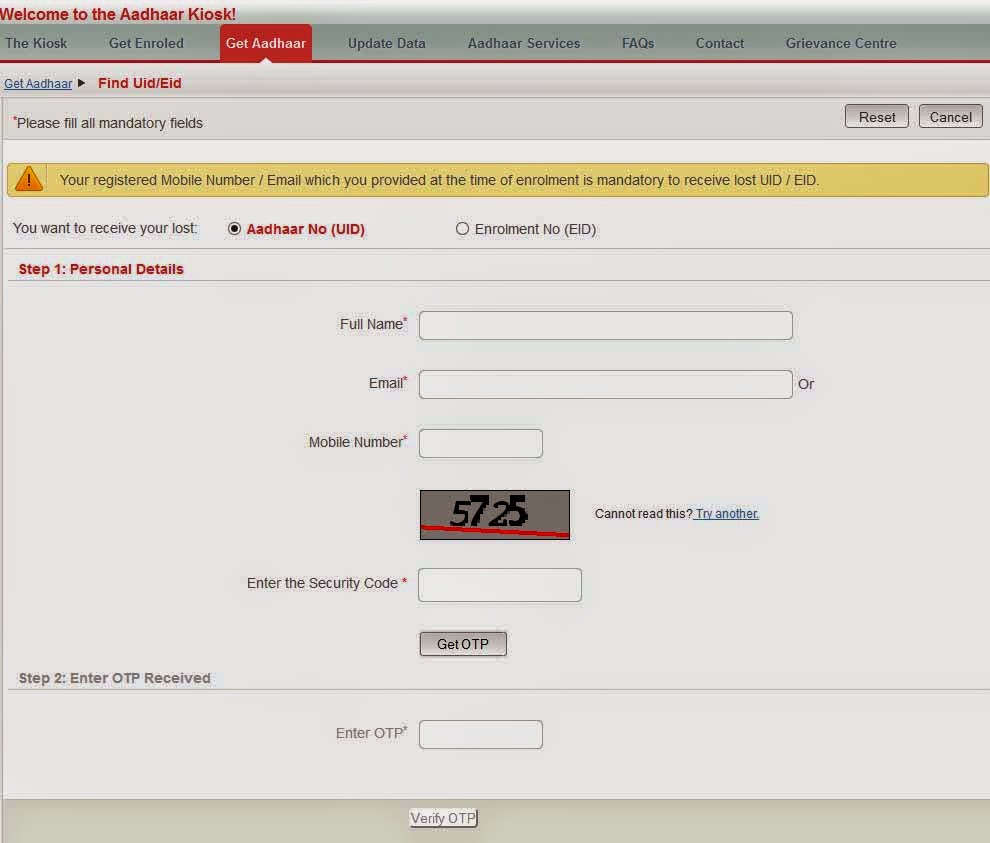
How to Get Aadhar Card Number with Name

Once you have Find UID page opened on your browser, from the first top options “You want to receive your lost: Aadhaar No (UID) or Enrolment No (EID)” select “You want to receive your lost: Aadhaar No (UID)”

Then in step 1 personal details column enter your Full Name, Email Id or Mobile Number, complete the captcha, and hit on get One Time Password.

You will receive the One Time Password (OTP) on your email id or mobile number (which ever you entered).

Enter the OTP received in the Enter One Time Password and hit on Verify OTP.

You will receive your Aadhaar Number on your mobile number or email id whichever you entered in the form.

This is how you can easily get Aadhar Card Number with Name.

Now you have your Aadhaar Number, and if you want you can even download copy of your Aadhaar Card by following our guide on how to download aadhaar card.

Wednesday, 15 June 2016

How to Find Aadhaar Card UID or EID by Name

Have you lost your Aadhaar Card Number or Aadhaar Enrolment Number? If yes than you can find Aadhaar Card Number (UID) or Aadhaar Enrolment Number (EID) by simply searching with name.

Below is the procedure to Search or Find Aadhaar Card UID or EID by Name.

Step by Step Guide on How to Find Aadhaar Card UID or EID by Name
  • To search Aadhaar Card Number or Aadhaar Enrollment Number by name just visit Find Uid/Eid page https://resident.uidai.net.in/find-uid-eid 
Find Aadhaar Card UID or EID by Name

    • Select you want to receive your lost Aadhaar Number (UID) or Aadhaar Enrolment Number (EID).
    • And enter the following details like Full Name, Email ID or Mobile Number, Enter the security code and click on get OTP.
    • Just enter the OTP received on your registered mobile number in below enter OTP field and click on verify button.
    • You will received your Aadhaar Enrolment Number (EID) or Aadhaar Number (UID) on your registered mobile number or email id.
    Once you get to know your Aadhaar Card Number or Aadhaar Enrolment Number you can do many more things like.
    1. Download your e-Aadhaar Card PDF Copy
    2. Check Aadhaar Card Status etc.

    Friday, 10 April 2015

    How to Find Aadhaar Number by Name

    At last Aadhaar have come up with new feature in which any resident can find their Aadhaar Number by name, which was earlier not possible if the resident have lost his Aadhaar Enrollment Slip or Aadhaar Card. This was the most awaited feature which have been recently launched on Aadhaar Portal. 

    Now if the individual have lost his Aadhaar Enrollment Slip or Aadhaar Card Number they can easily find their Aadhaar Number by name and can download a new duplicate copy of Aadhaar Card and use it for various purposes. So below steps will allow you to know How to Find Aadhaar Number by Name.

    Learn How to Find Aadhaar Number by Name


    • Visit the official Aadhaar website which allows you to search your Aadhaar Number by name by clicking here.
    How to Find Aadhaar Number by Name

    • Once you are there on the page Find Uid/Eid, select the appropriate option from the form “You want to receive your lost: Aadhaar No (UID) or Enrollment No (EID).
    • Once you select the applicable option from it just fill the below form which includes Full Name, email id or mobile number, solve the below captcha and hit on Get OTP button. Once you hit on get OTP button the One Time Password will get instantly delivered to your mobile number just enter the OTP which you received through SMS in the Enter OTP field provided in the form and click on verify OTP.
    That’s it now you can download your Aadhaar Card and print a color copy of it to use and produce it for various purposes.

    Also Read: How to Download Aadhaar Card Copy

    Monday, 20 October 2014

    Find Aadhaar Card Number by Name

    Aadhaar Card Official Portal to check status of Aadhaar Card Generation process allows to track it with the help of Aadhaar Enrollment ID and if you don’t have that Enrollment ID you are not able to track the status of your Aadhaar Card Online so only option will be you will have to wait until your Aadhaar Card gets delivered at your postal Address. 

    Find Aadhaar Card Number by Name

    Checking Aadhaar Card status helps to know you whether your Aadhaar enrollment have been approved or rejected.

    To help those all people and to make ease in the system the Aadhaar Officials will be soon launching Find Aadhaar Card Number by Name this feature will help easily to download Aadhaar Card, check Aadhaar Card Status by Name without any Aadhaar Enrollment ID or Aadhaar Card Number you will just have to enter your full name, postal code, mobile number and you are set to Find Aadhaar Card Number by Name.


    Currently this feature Find Aadhaar Card Number by Name is still not implemented but it will be soon implemented in future to make some ease in Aadhaar Card. To know about release of this feature Find Aadhaar Card Number by Name stay connected with us, as soon as Find Aadhaar Card Number by Name feature gets available in the Official Aadhaar Card Portal we will post an update.


    Update: You can now Search Aadhaar Number by Name.